Agentic team development

From idea
to working software.

An AI agent in every role: one plans, one reads the code, one writes it, one tests, one reviews. They work as a team and bring the work as a pull request. The merge is your call.

How it works

One task,
delivered in five steps.

The cards below are samples; real work runs in your own repository.

  1. 01 · PlansPlanning agent

    Clarifies the work

    Takes your request or a suggestion from the report, clears up the ambiguity and splits the work into small steps.

    Add coupon codes to the cartsample
    • Coupon validation service
    • Discount on the cart total
    • Invalid coupon warning
    Plan ready
  2. 02 · LearnsCode reader agent

    Reads your repository

    Maps the structure, your rules and the domain knowledge, and finds where the change will land.

    Repository analysissample
    • Business: B2B ordering portal
    • Stack: Node.js · PostgreSQL · React
    • Touches: cart and coupon modules
    Reading done
  3. 03 · BuildsDeveloper agent

    Writes the code

    Follows your architecture and your rules. Every task gets its own branch.

    feature/coupon-codesample
    • + const discount = await coupons.apply(cart, code);
    • + if (!discount.valid) return invalidCoupon(code);
    • − total = cart.subtotal;
    6 files changed
  4. 04 · TestsTest agent

    Comes with its tests

    Writes and runs the unit tests for the change; the work does not move on while a test is red.

    Unit testssample
    • coupons.apply · passed
    • Invalid coupon · passed
    • Cart total · passed
    All green
  5. 05 · DeliversReview and git agents

    A pull request arrives

    The change is reviewed, its docs are updated, it is committed and pushed, and a pull request opens. Leave a comment and the revision agent fixes it.

    Coupon code supportsample
    • Plan · change · test report
    • Revised from your comments
    • The merge is yours
    Awaiting your approval
Sample job

Watch one job
end to end.

Without signing up, see how the agent team carries a job on a sample project: plan, your approval, code, tests, review and pull request.

Facimus · Job · Add coupon codes to the cartWriting the planWaiting for your approvalCodingTestingReviewingWaiting for your merge
  1. Plan
  2. Approval
  3. Code
  4. Test
  5. Review
  6. Pull request
  1. PlannerPicked up the job: add coupon codes to the cart.
  2. Code readerRead the cart and coupon modules; the change will touch six files.
  3. PlannerWrote the plan: three steps, each tied to an acceptance criterion.
  4. PanelThe plan is waiting for your approval. On this job, no code is written before you approve it.
  5. YouYou approved the plan.
  6. DeveloperOpened the feature/coupon-code branch.
  7. DeveloperChanged six files; the main branch was not touched.
  8. Test writerWrote four unit tests for the change.
  9. Test writerRan the tests: all four passed.
  10. ReviewerReviewed the change against your rules and updated the README.
  11. GitCommitted and pushed; the pull request is open.
  12. PanelThe merge is your call.
Plan
  1. Coupon validation service
  2. Discount on the cart total
  3. Invalid coupon warning
Approve plan✓ Approved
Code
  • + const discount = await coupons.apply(cart, code);
  • + if (!discount.valid) return invalidCoupon(code);
  • + total = cart.subtotal - discount.amount;
  • − total = cart.subtotal;
Test
  • coupons.apply · passed
  • Expired coupon · passed
  • Invalid coupon · passed
  • Cart total · passed
Review
  • Follows your rules
  • Coupon code input is validated
  • README updated
Coupon code support
  • feature/coupon-code → main
  • 6 files · 4 tests
  • Plan, change and test report attached
Merge

This is an illustrative, sped-up example; real jobs run on your repository and take longer depending on its size.

Inside the product

One team board.
One agent team.

One panel to hand work to agents, watch them live and measure the result. The screens below are the product itself.

The path of one job: a Sentry error and a new job land on the board, the plan is approved, the agent team moves stage by stage, the job arrives as a pull request and is merged. Screen recording from the real panel; the sample job shown is scripted and sped up, it does not touch a real repository and runs no AI. The Value dashboard uses sample data. Download the video (WebM)
Text of the captions in the video
  1. An error from Sentry and a new job land on the board as cards
  2. The agent team wrote a plan. No code is written before you approve (default setting).
  3. Plan approved; the team gets to work
  4. On the live screen the job moves from specialist to specialist
  5. The developer agent writes the code
  6. The test agent runs the tests
  7. The reviewing agent checks it against your rules
  8. The change is pushed and a pull request opens
  9. The scenario agent prepares a test scenario
  10. The job arrives as a pull request. Merging is your call.
  11. Merged
  12. Value dashboard: delivered work, cost and hours saved

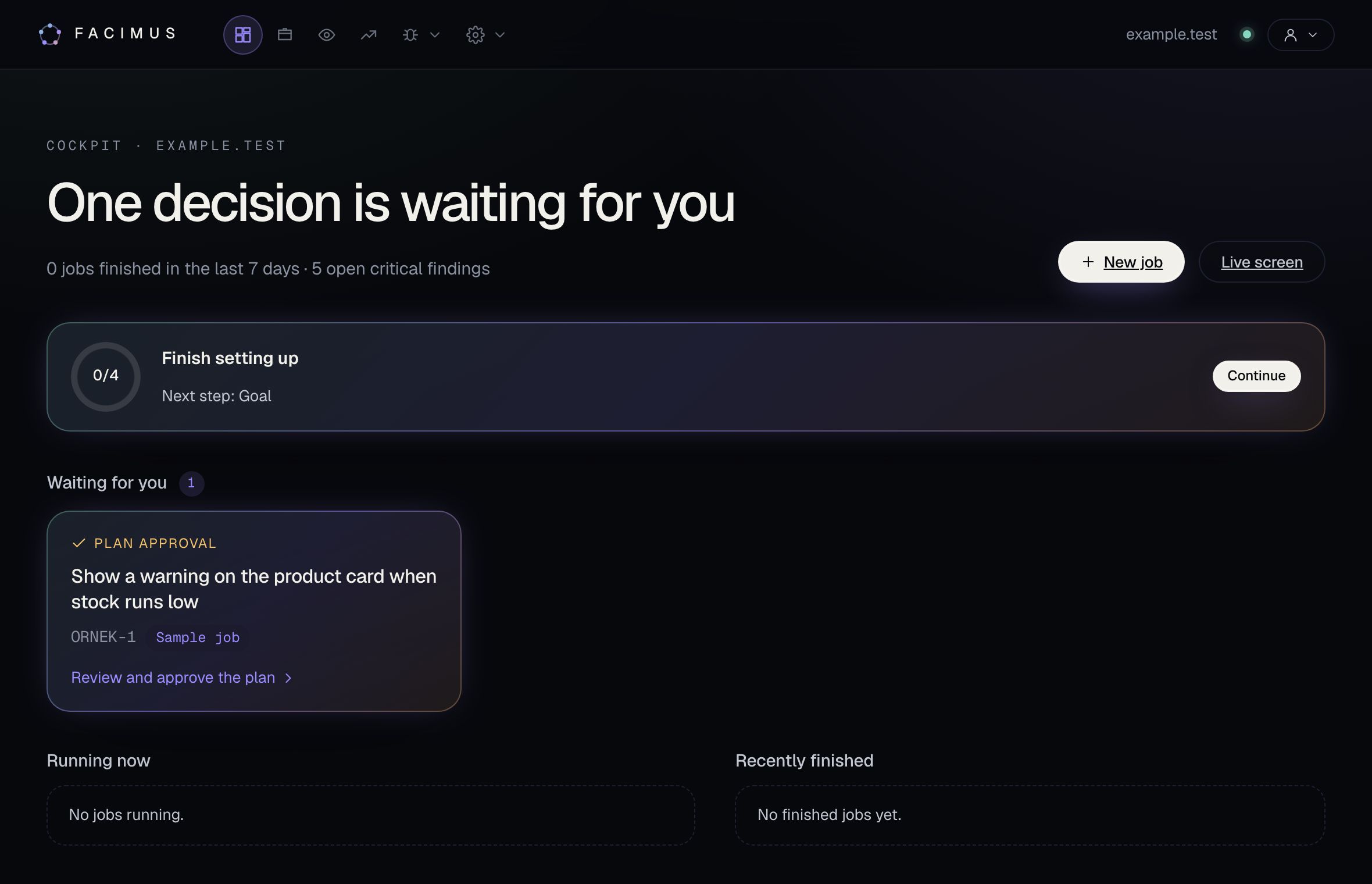
See what is waiting for you first

The cockpit starts the day with decisions: plans waiting for approval, stuck jobs and open critical findings at a glance.

  • Open a waiting plan in one click
  • Jobs running now and recently finished
  • Remaining setup steps and the next one
Facimus cockpit: a plan waiting for approval and the job summary

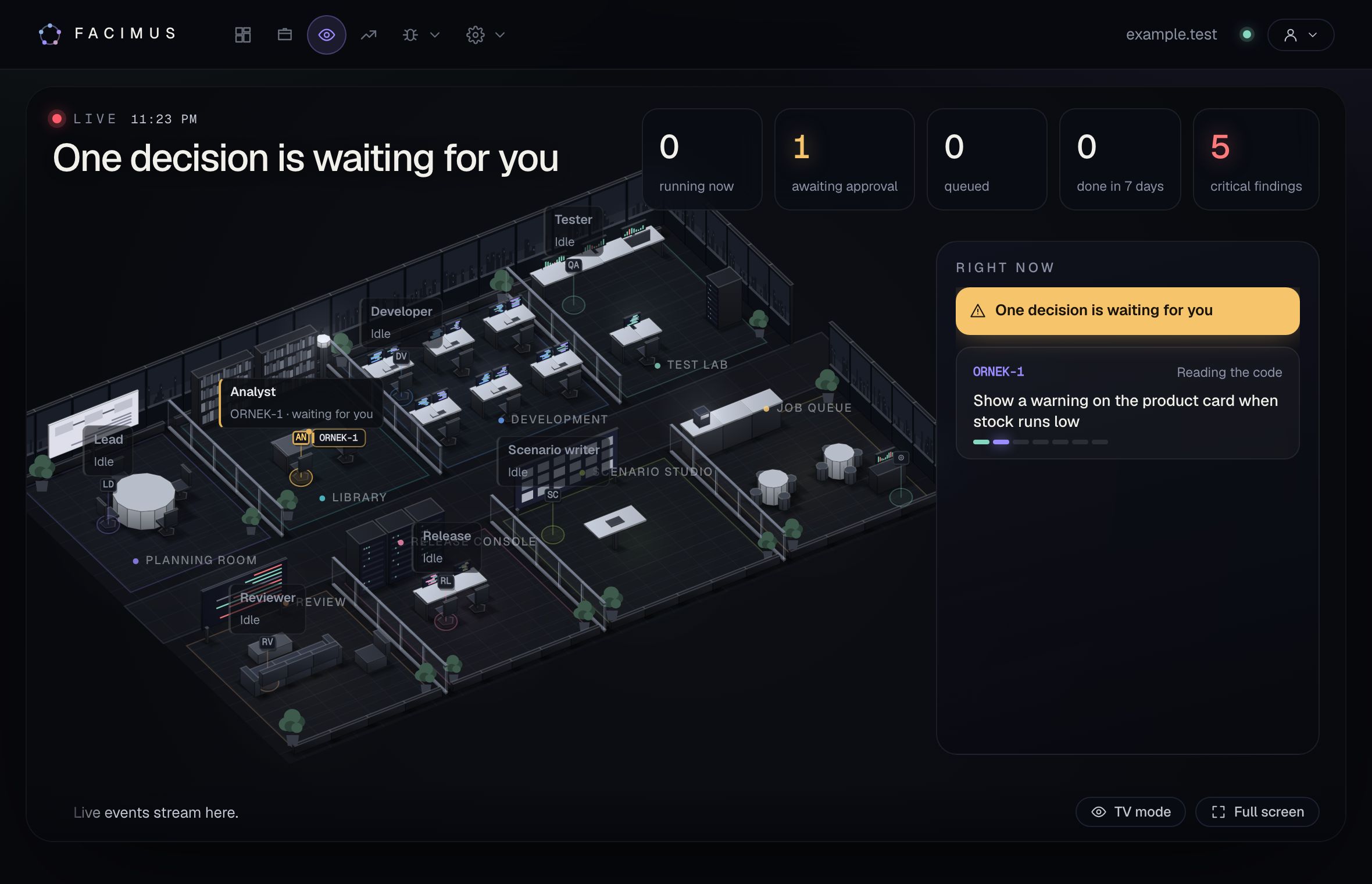
Watch your agent team in the office

Every role has its own desk. As a job moves from planning to code, testing and review, its card flies from specialist to specialist; built for big screens and TV mode.

  • Who is doing what, who is waiting for you
  • Jobs waiting for approval stand out
  • Office view and full-screen TV mode
Facimus live screen: agent roles and job flow in a 3D office

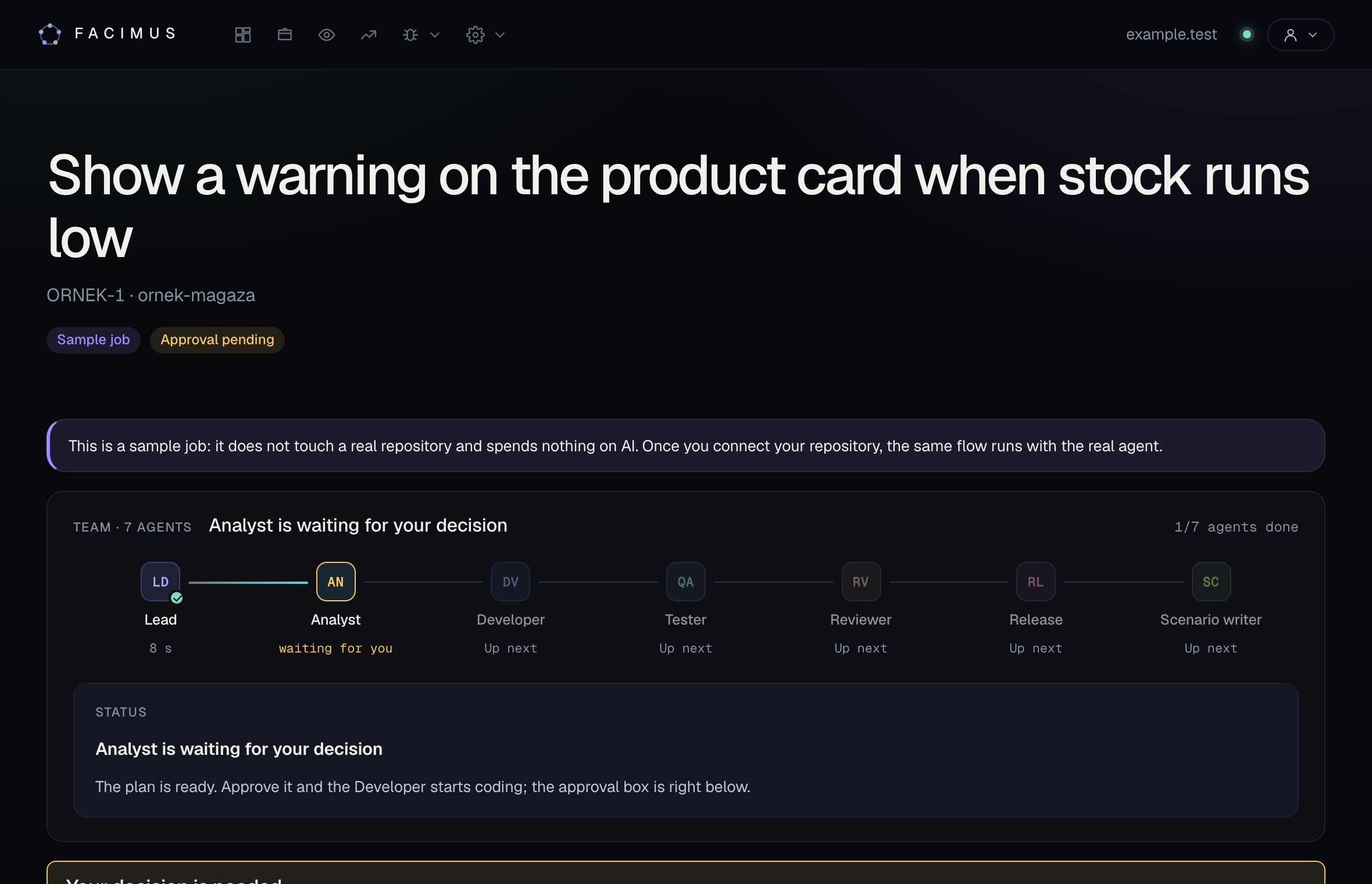
Every job goes through the same safe pipeline

Planning, reading the code, coding, testing, review, git and scenario. Each stage's output and evidence stays on the job page; the plan never turns into code without your approval.

  • Stage-by-stage progress and duration
  • Plan approval in the panel or in Slack
  • Steer the agent with a team note
Facimus job page: a seven-agent pipeline with a plan waiting for approval

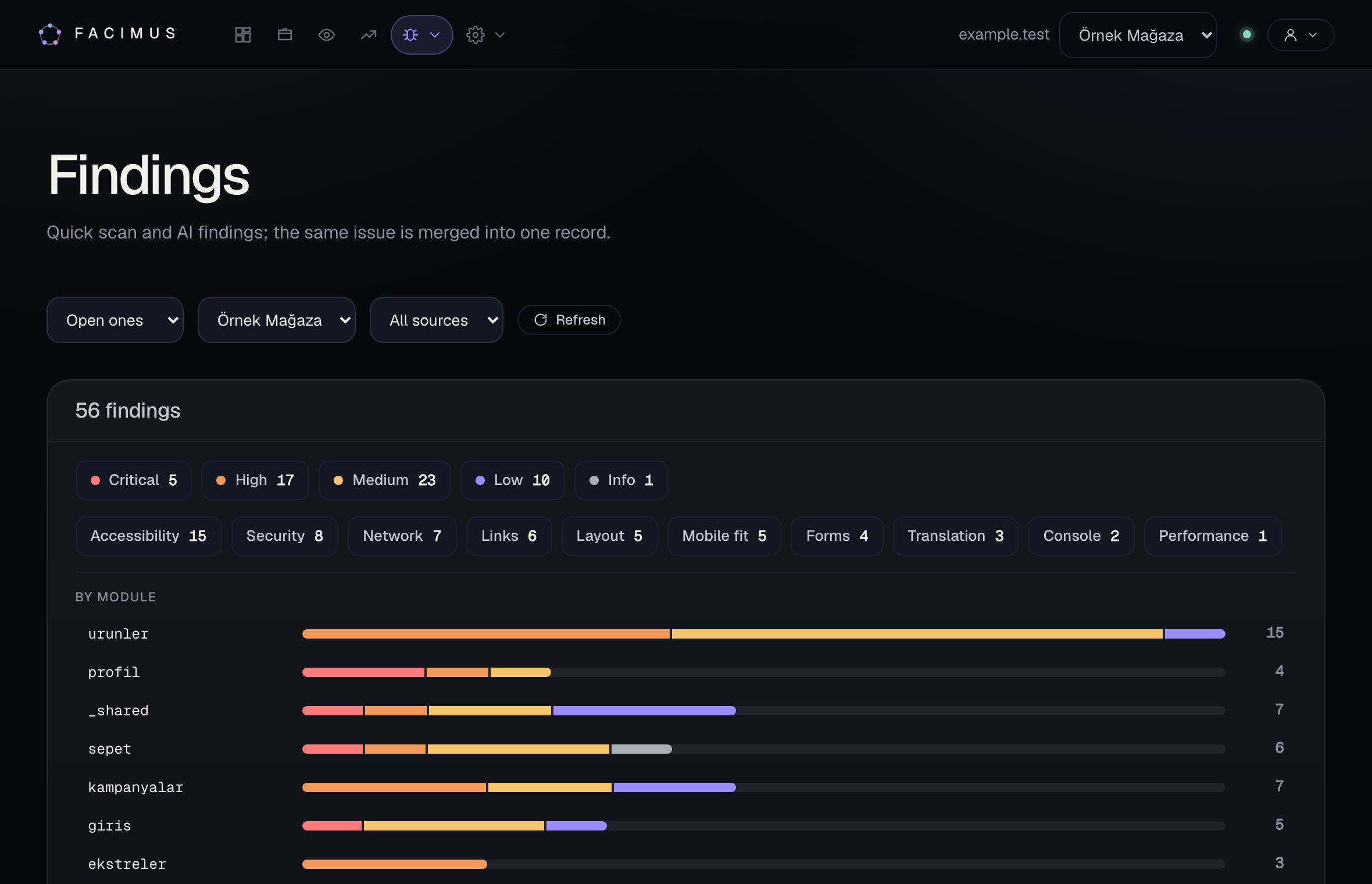
Let an agent explore your app and find bugs

Quick scans and AI-driven smart testing explore your app in a browser and group accessibility, security, form, mobile and console problems by module. One click turns a finding into a fix job.

  • The same bug is grouped into one record
  • Breakdown by severity and module
  • From finding to fix job
Facimus findings: findings by severity and module

See what you gain, in numbers

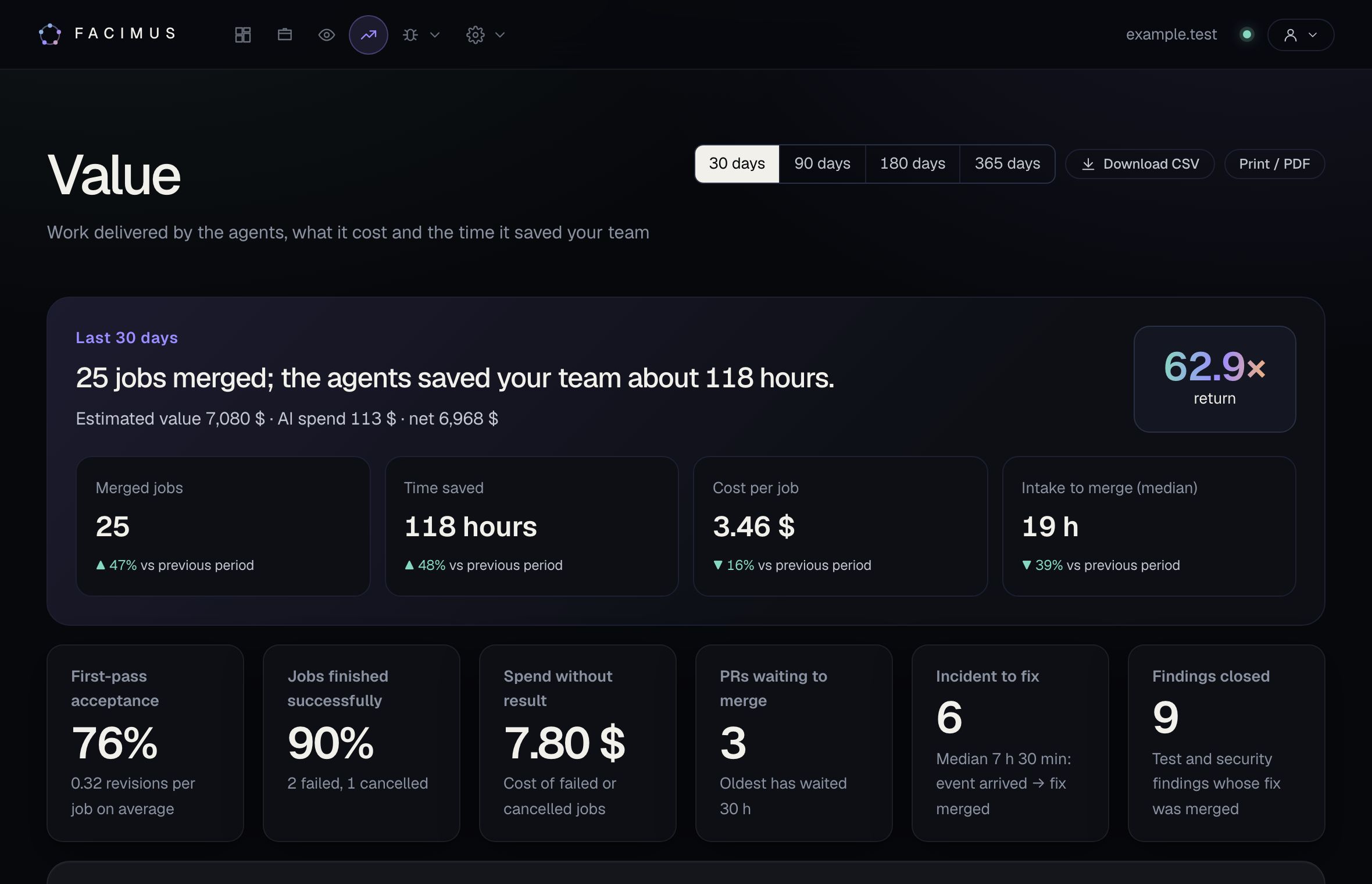
Merged jobs, cost per job, intake-to-merge time and its bottleneck, first-pass acceptance and engineering hours saved, compared with the previous period.

  • Return against all AI spend
  • Where the time goes: bottleneck and advice
  • CSV and a printable executive report
Facimus Value dashboard: merged jobs, hours saved and return

Screens are shown with sample data.

Platform

Fit the agent
to your team.

Not a generic AI: a team that learns your code, your rules and the way you work.

  1. Incoming events

    An error arrives, a card opens

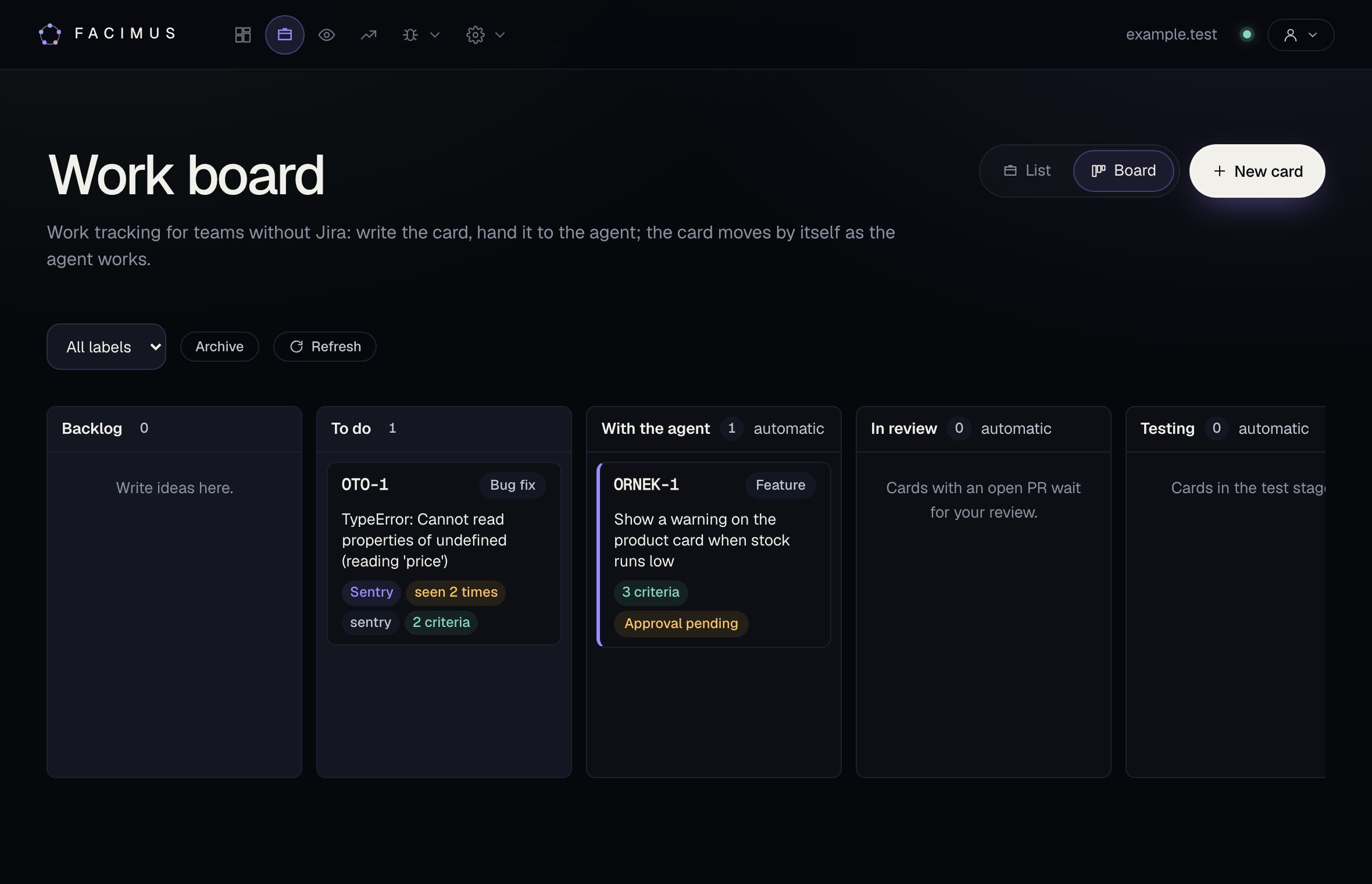
    Events from Sentry, GitHub, GitLab, Linear or your own webhook land on the board as cards. Repeats are counted, and a closed error that comes back is caught as a regression.

    • Signed endpoint with replay protection
    • External jobs cannot run commands before approval
    • Labelled events can start the job automatically
    Facimus job board: an error card from Sentry and a job waiting for approval
  2. App memory

    The agent reads what matters, not the whole repo

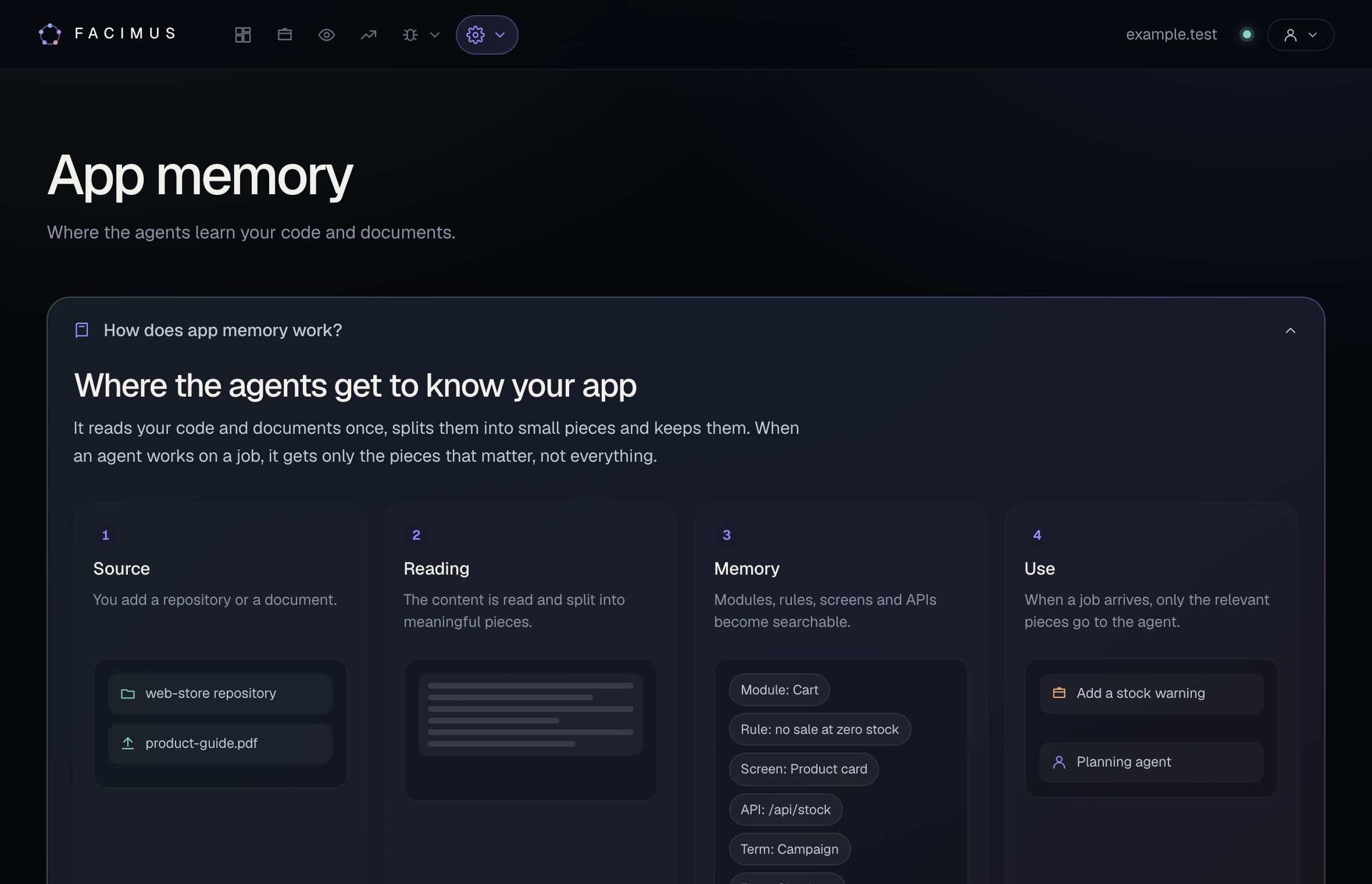
    Your code and documents are read once and split into meaningful pieces. When a job arrives the agent gets only the modules, rules, screens and APIs that matter for it.

    • Repository and document sources
    • Approved rule packs
    • Searchable map of modules, screens and APIs
    Facimus app memory: source, reading, memory and use steps
  3. Skills

    Teach your team's methods

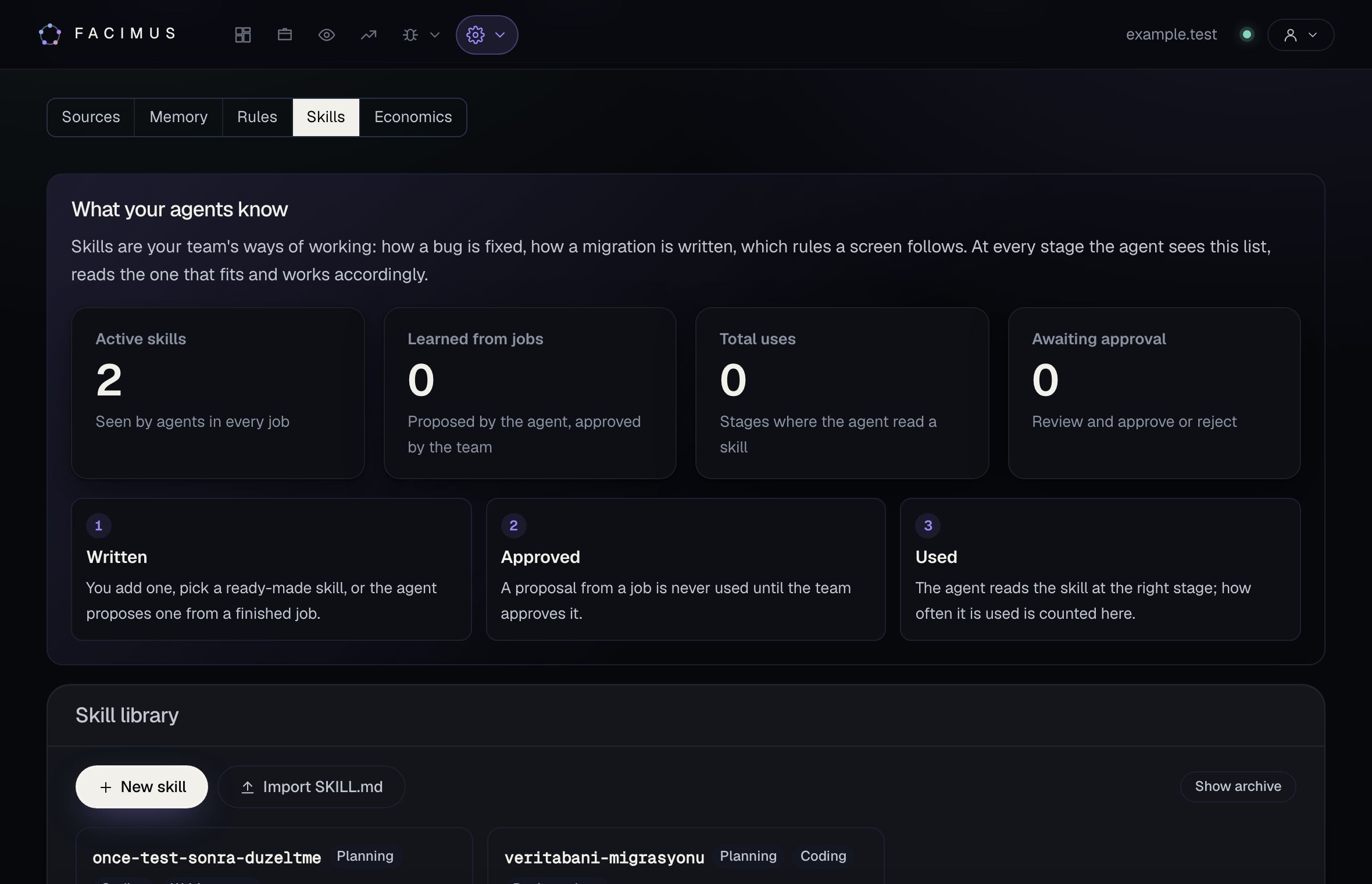
    Methods like "reproduce a bug with a test first" or "this is how we write migrations" become skills. When the agent finds a reusable method in a job it proposes one; nothing is used until your team approves it.

    • Compatible with Claude Code SKILL.md
    • Ready-made skills to start fast
    • Usage count and version
    Facimus skill library: active skills and the usage flow
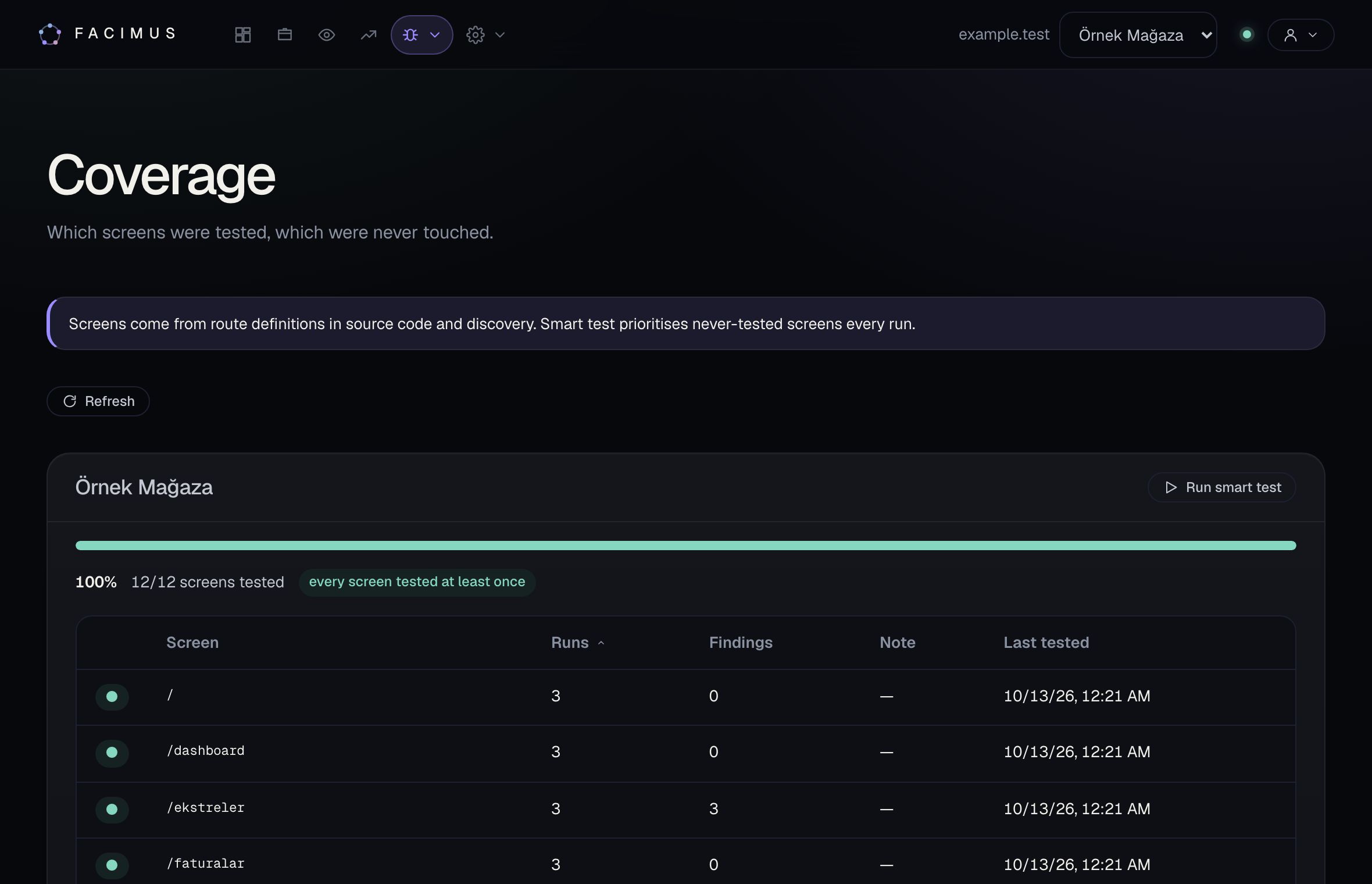
  4. Coverage

    Which screen was never tested?

    The screen list comes from the route definitions in your source code and from exploration. Smart testing gives priority to screens nobody has touched.

    • Runs and findings per screen
    • Screens with scenarios are marked
    • Tested again after merge with a linked test project
    Facimus coverage: tested screens and run counts
  5. Models

    Your model, your account, your region

    Agents run on Claude. In your own runner (on-premise or your own server) you choose which account and which cloud region the model is called from. Assign a model per stage, for example a strong one for planning and a fast one for the commit stage.

    • Model per stage
    • Budget with your own price table
    • In your own runner, keys stay with you
    • Anthropic APIDirect
    • AWS BedrockYour AWS account
    • Google Vertex AIYour GCP project
    • Microsoft FoundryYour Azure resource
    • Corporate LLM gatewayAnthropic compatible
Integrations

Connects to the tools
you already use.

No new tool to move to; Facimus connects to the places your team already works.

  • Code and pull requests

    • GitHub
    • Bitbucket
    • Other git servers (branch push)
  • Work tracking

    • Jira import and sync
    • Built-in job board
    • Bulk jobs from Excel and CSV
  • Incoming events

    • Sentry
    • GitHub
    • GitLab
    • Linear
    • Signed webhook
  • Notifications and approval

    • Slack (with approval)
    • Email and weekly digest
    • Webhook
    • ntfy
  • Identity and access

    • Company sign-in (SSO) with OpenID Connect
    • User sync with SCIM
    • Sign in with Google
    • Two-step verification
  • Developers

    • REST API and access keys
    • External agents that submit scenarios and jobs
    • Workspace export
Team

An agent
in every role.

Whatever each person does in a software team, an agent does here. When one finishes, it hands over to the next; comment on the pull request and the revision agent brings back a fix.

  1. PlannerClarifies the request and splits the work into steps.
  2. Code readerMaps the repository's structure and rules.
  3. DeveloperWrites the code on its own branch.
  4. Test writerWrites and runs the unit tests for the change.
  5. ReviewerReviews the change and updates the docs.
  6. GitCommits and pushes; a pull request opens.
  7. RevisionWeighs your pull request comments and fixes them.
  8. Scenario writerDrafts a test scenario for the change.
Trust

Your code stays yours.
So does the decision.

What to know before you open your repository to the agent team.

  • 01

    Cannot push to protected branches

    Every job happens on its own branch and arrives as a pull request. Agents are never given the repository key; the git gate in the runner allows pushes only to the job's branch and refuses pushes to protected branches. For extra assurance, keep branch protection on at your git provider.

  • 02

    Two decisions are yours

    By default, no code is written before you approve the plan; only you can turn on continuing without approval. The platform never merges a pull request itself.

  • 03

    Only the repositories you connect

    Agents take work only in the repositories you add. We recommend scoping the access key to those repositories; you can revoke access at any time.

  • 04

    Isolated runner

    In the cloud, development jobs run in an isolated runner reserved for each workspace, and it shuts down when idle. Workspace data is separated at the database level.

  • 05

    Encrypted keys

    Your access keys are stored encrypted and handed only to the runner doing the job, at the moment it runs.

  • 06

    Every step on record

    The plan, the change, test results, cost and who approved what stay in the job's history.

Deployment

Runs wherever
you want it to.

  • CloudNothing to install; we run the agents.
  • On-premisesThe platform runs in your data center; the AI key and its cost are yours.
  • Your own serverIn your own cloud account, under your own control.
Who it is for

One platform,
many teams.

From product teams to enterprise IT: the same agent team, with your rules.

Product team
Situation
The backlog keeps growing; developers spend most of their time on small fixes and maintenance.
With Facimus
Hand routine cards to the agent; approve the plan and the job arrives as a pull request. The team goes back to the hard problems, and the Value dashboard shows the hours saved.
Software agency and consultancy
Situation
Many client repositories, each with its own rules and tight deadlines.
With Facimus
Each client gets its own workspace with its own rules and skills. Report delivered work and cost to the client.
Enterprise IT
Situation
Security and compliance come first; code and data must not leave the company and access must be managed centrally.
With Facimus
With an on-premise install the whole platform runs in your network and the model in your own cloud account. Company sign-in, user sync, audit log and budget caps are ready.
Quality team
Situation
Every release brings fear of regressions; nobody knows which screens were tested.
With Facimus
The agent explores the app and collects findings, the coverage map shows the gaps; a finding becomes a fix job and, with a linked test project, is tested again after merge.
Plans

Grows
with your team.

No payment or card details at sign-up. Your account starts on the Starter plan; when you grow, you request a quote from the panel.

  • Starter

    To try it with one repository and a small team.

    New accounts start here

    • 1 repository
    • 3 members
    • 20 development jobs a month
    • 10 autonomous tests a month
    • USD 50 monthly AI quota
  • For most teams

    Team

    For teams with several repositories and a steady flow of work.

    Let's talk pricing

    • 10 repositories
    • 20 members
    • 200 development jobs a month
    • 100 autonomous tests a month
    • USD 100 monthly AI quota
  • Enterprise

    Enterprise sign-in, user provisioning and every deployment option.

    Let's talk pricing

    • Limits set by quote
    • USD 200 monthly AI quota
    • Enterprise sign-in (SSO) and user provisioning (SCIM)
    • Audit log export
    • Cloud, on-prem or your own server
    • Dedicated support

The AI quota is what agents may spend in the cloud in a month; on-prem and on your own server, AI costs are yours.

FAQ

Questions
we hear often.

Does the agent merge code on its own?

No. Every job is done on its own branch and arrives as a pull request; merging is always your call. By default no code is written before you approve the plan either.

Where does our code run?

Either in the cloud, in an isolated environment reserved for your workspace, or in a runner inside your own network. With an on-premise install the whole platform runs in your data center.

Which AI models does it use?

Agents run on Claude. In the cloud the platform's model account is used; in your own runner you choose the Anthropic API, AWS Bedrock, Google Vertex AI, Microsoft Foundry or your Anthropic-compatible corporate gateway. A different model can be assigned per stage.

Which repositories does it work with?

On GitHub and Bitbucket it opens the pull request itself and follows reviews. On other git servers it pushes the branch and you open the pull request.

How do we keep costs under control?

Set a monthly budget cap and a per-job cap; when the cap is reached no new job starts. The Value dashboard shows cost per job and return.

How long does it take to get started?

Right after signing up you can watch the agent team work on a sample project. The first job on your own repository starts once the repository is connected and the runner is ready.

What happens to our data if we leave?

Your code is already in your repository. Jobs, rules, skills, scenarios and findings are exported as a single file; the audit log is downloaded separately as CSV or JSON.

What is agentic team development?

Your next release
starts here.

Early access opens soon. Once it does, you can start right here.